Why should you use the Zucchetti integration?
Zucchetti allows you to quickly pass information over employees' absences to your bookkeeper, saving time on manual work. Zucchetti is an integration that works in the domain of payroll.
How to set up the integration?
Zucchetti integration works for employees with fixed contracts with a number of hours that is equal every week (e.g. 40 hours per week). Your bookkeeper needs to store the theoretical working hours of your employees into Zucchetti and would also need to make sure that during the import phase ("Importa Movimenti Paga da esterno") the option "Completamento del teorico con ore lavorate" is flagged in the "Rilevatore Presenze".
- In your sidebar, go to Discover
- Access the Integrations tab
- Scroll down till you find Zucchetti
- Press on Install for company

- Head to Settings
- Access the Compensation section
- Scroll down to Payroll integrations
- Click on Zucchetti integration settings
- Configure and assign Zucchetti codes

Administrators must activate the Zucchetti integration through the app section to be able to map absences types (sick leaves and holidays) with Zucchetti corresponding codes. Administrators can insert all this information down here.
An employee code in Zucchetti has 6 figures (000002). 0s should be included.
A company code in Zucchetti has this format: 0000123 (7 figures). 0s should always be included. Please ask your bookkeeper to provide the following codes:
- Zucchetti Company Code
- Zucchetti Employee Codes
- Zucchetti Absence Codes
How to set up the Zucchetti employee code?
- Head to Organisation
- Select the employee in question
- Head to Personal tab
- Scroll until you find Payroll Information
- Insert the code provided by the bookkeeper into Zucchetti employee code

Note that you can assign the codes to employees in bulk by using the importer:
- Go to Organisation in the sidebar
- Select the employees you want to modify
- A pop-up will appear → select Edit employees
- Select the legal entity and click on Download employees template
- Open the template and add the employees codes in the column called *Zucchetti ***employee code
- Save the file and drag and drop your file
- Click Import file to assign the codes to all employees listed in the file
When the integration is installed, a new Zucchetti code field will be available in the Personal Data of each employee. This will allow admins to individually manage Zucchetti codes.
Contract hours
Zucchetti calculates theoretical hours which refers to the hours employees work per week. The calculation of time off is done based on the theoretical hours employees should have worked.
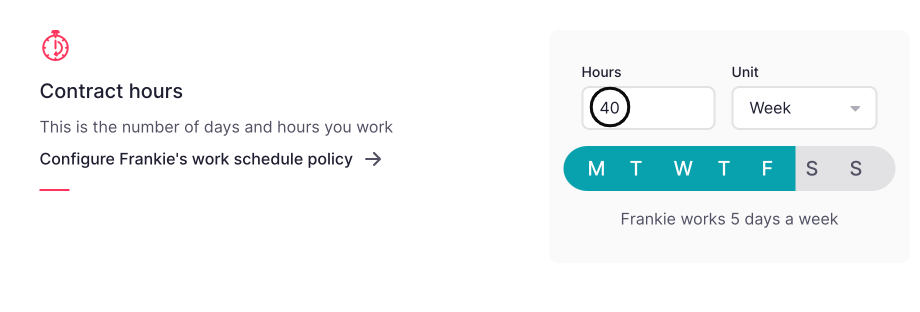
Example: Frankie works 40 hours per week across 5 days = 8 hours per day.
Frankie decides to take half-day off on April 1st. Factorial will export in the Zucchetti .xml file, 4 hours of holiday (1 day) on April 1st.
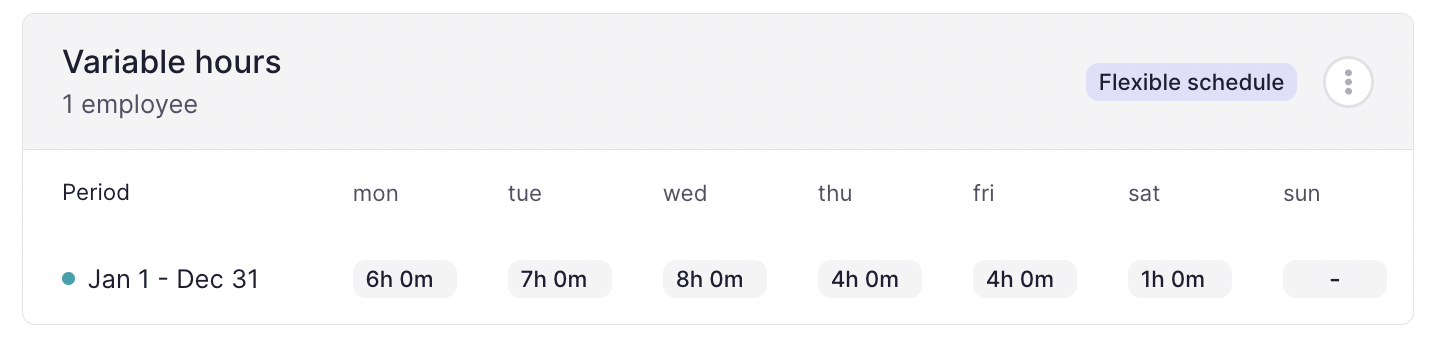
For employees with variable daily working hours (e.g. Monday -> 6 hours, Tuesday -> 7 hours), it will be necessary to set the daily working hours in the "Work schedules" section in order to correctly calculate the absence requests.
How to export payroll variables from Compensation
You can export payroll variables such as bonuses, commissions, extra hours, and expenses directly from Compensation in the official formats required by Zucchetti. This streamlines payroll workflows, reduces manual work, and ensures data consistency.
- In your sidebar, go to Compensation
- Select a cycle
- Click on Export as (Zucchetti)
You can check the exports and download them by clicking in Activity > Documents in the upper right corner.

Tips
- Always double-check that payroll concept codes match your payroll system’s requirements
- Review the format specifications as this is a new integration
- Test exports with a small batch of employees before running a full payroll export
- Keep integration and employee profiles up-to-date to avoid export errors