Who this article is for
This article is intended for company owners, HR managers, or administrators who need to create a Factorial account for their organization.
Who it is NOT for
- Employees looking to create personal user accounts under an existing company.
- Users who already have a Factorial account linked to a company — in that case, login instructions should be followed instead.
Who can create a Factorial account
- Company owners setting up their organization for the first time.
- HR managers or administrators authorized to create the company account.
No invitation is needed if you are creating a new company account as an owner or admin.
When you should NOT create a new account
- If your company already has a Factorial account — creating a new one may cause duplicate records.
- If you are an employee joining an existing company account — you should request an invitation instead.
- If you are trying to create a personal account unrelated to a company — use the employee sign-up process instead.
How to create a new company account
- Access FactorialHR
- Click on Log In
- Click on Get started now in the upper right corner
- Add your work email or register with Google or Microsoft
- Click on Continue
- Fill in the required information
- Click on Get started
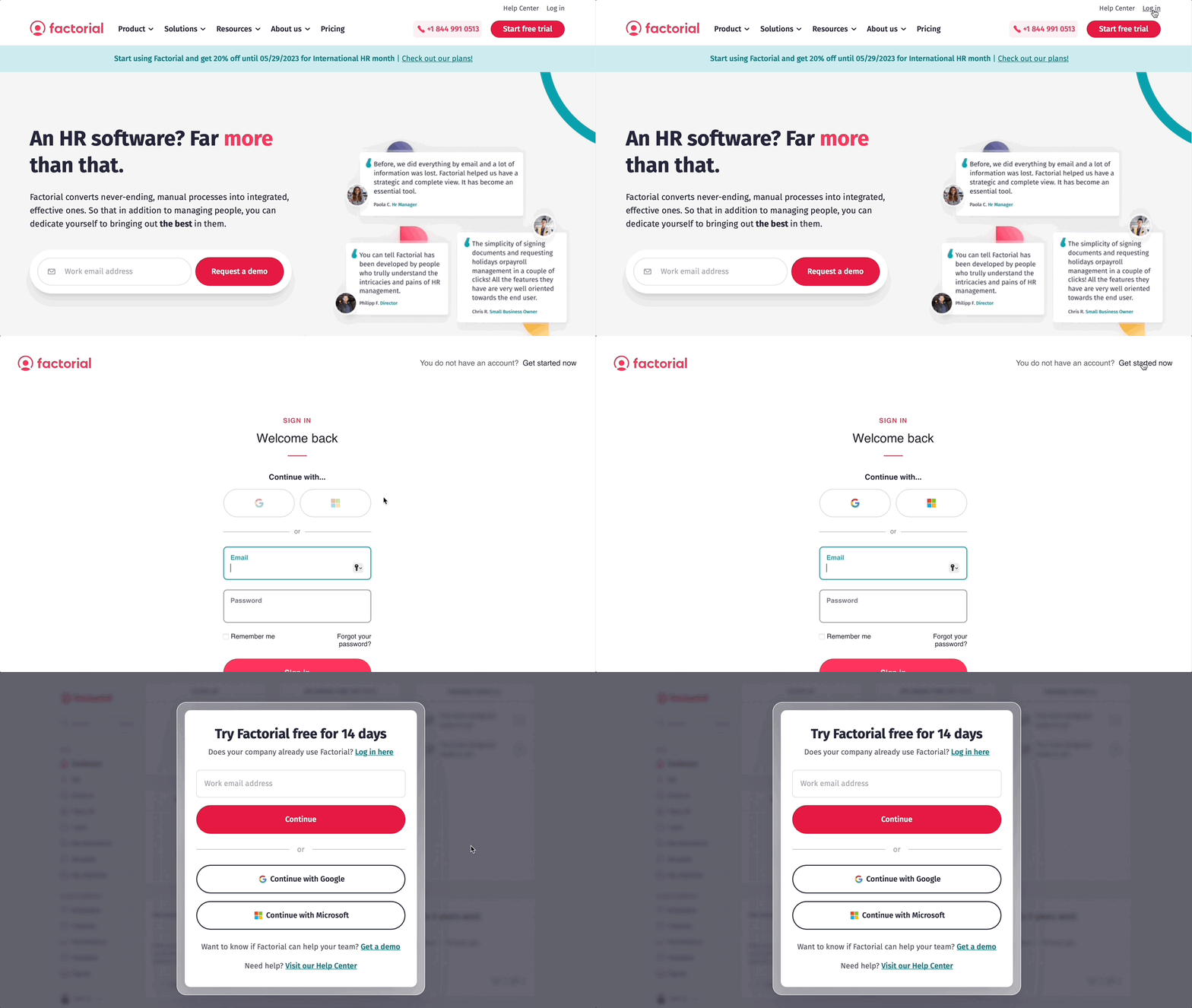
❗If the registration process was not successful, please reach out to our support team for assistance.
Contact support team
What happens after registration
- You will receive a confirmation email to verify your account.
- Once verified, you can log in to Factorial and complete your company profile.
Admins will be able to invite employees and configure settings such as time tracking, absences, and payroll.
Common issues and next steps
-
Didn’t receive the confirmation email?
- Check your spam or junk folder.
- Make sure you entered the correct email address during registration.
-
The company already exists
If Factorial detects an existing company account, do not create a new account. Contact support or ask an admin from your company to invite you. -
Unable to access certain features?
- Make sure your user has admin permissions.
- Review the setup guide for configuring your company account in Factorial.