For macOS 14 and above, users receive notifications prompting updates with increasing frequency as deadlines approach, while Windows users are encouraged to update via the native dialog, with administrators needing to intervene in cases of low disk space.
Mac
MacOS 14 and above
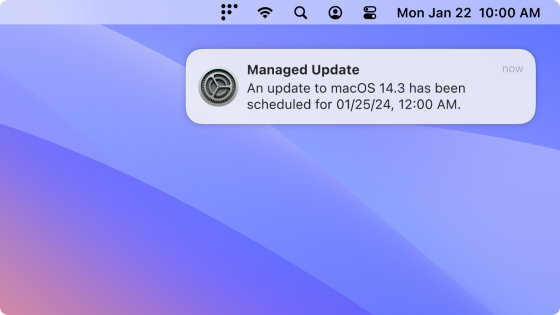
When a minimum version is enforced, the end users see a native macOS notification (DDM) once per day. Users can choose to update ahead of the deadline or schedule it for that night. 24 hours before the deadline, the notification appears hourly and ignores Do Not Disturb. One hour before the deadline, the notification appears every 30 minutes and then every 10 minutes.
If the host was turned off when the deadline passed, the update will be scheduled an hour after it’s turned on.
For macOS devices that use Automated Device Enrollment (ADE), if the device is below the specified minimum version, it will be required to update to the latest available version during ADE before device setup and enrollment can proceed.
Before macOS 14
End users are encouraged to update macOS (via Nudge)

| > 1 day before deadline | < 1 day before deadline | Past deadline | |
|---|---|---|---|
| Nudge window frequency | Once a day at 8pm GMT | Once every 2 hours | Immediately on login |
| End user can defer | ✅ | ✅ | ❌ |
| Nudge window is dismissible | ✅ | ✅ | ❌ |
Windows
End users are encouraged to update Windows via the native Windows dialog.
| Before deadline | Past deadline | |
|---|---|---|
| End user can defer automatic restart | ✅ | ❌ |
If an end user was on vacation when the deadline passed, the end user is given a grace period (configured) before the host automatically restarts.
For all scenarios detailed above, the deadline applies from the "update availability date", not the configuration date of the policy in Factorial IT cockpIT. If you have employees on an older version for longer than the chosen deadline, they will be prompted to update their OS immediately.
Special case of low disk space
For all 3 scenarios, an administrator may need to intervene if updates are failing and the user is not able to free up space. None of the platforms manage disk space issues on their own to install updates.
Mac
-
MacOS 14 and above
The end user is nagged to install the update with a system notification and will see in System Settings they don't have enough space to install the update. They will have to free up space on their own to stop the nags to update. -
Before macOS 14
The Nudge window will appear and the user will be directed to System Preferences to download and install the update (which will fail). The Nudge window will behave as normal where it cannot be dismissed after the deadline. The end user will have to free up space on their own to install the update to dismiss the Nudge window.
Windows
When the deadline is met, the user will be told they need to update, then the update will fail and the user will be told they need to free up space.