CIS Benchmarks provide secure configuration guidelines developed through community consensus to enhance system, software, and network security, featuring two levels of profiles for varying security and usability impacts, along with specific implementation instructions for integrating these benchmarks into MDM tools like Fleet and Primo.
What are CIS Benchmarks?
CIS Benchmarks are consensus-based secure configuration guides used to harden systems, software, and networks—an industry-recognized baseline to reduce attack surface.
How are they produces?
They are community-developed through an open consensus process (CIS WorkBench) with government, industry, and academia. There are 100+ benchmarks across 25+ vendor families
Levels 1 and 2
Each benchmark ships with profiles:
- Level 1: prudent, low-impact settings that provide clear security value.
- Level 2: stronger, defense-in-depth settings that may affect usability/performance.
How to add CIS Benchmarks
If you want to download fleetDM CIS Benchmarks policies on your MDM instance, you can run this script to generate the CIS policies queries YAML file.
#!/bin/bash#shellcheck disable=SC2207# convert.cis.policy.queries.yml @2024 Fleet Device Management# CIS queries as written here:# https://github.com/fleetdm/fleet/blob/main/ee/cis/macos-14/cis-policy-queries.yml# must be converted to be uploaded via Fleet GitOps.## This script takes as input the YAML from the file linked above & creates a new YAML array compatible with the "Separate file" format documented here:# https://fleetdm.com/docs/configuration/yaml-files#separate-file# get CIS queries raw file from Fleet repocisfile='https://raw.githubusercontent.com/fleetdm/fleet/refs/heads/main/ee/cis/macos-14/cis-policy-queries.yml'cispath='/private/tmp/cis.yml'# cisspfl='/private/tmp/cis.gitops.yml'/usr/bin/curl -X GET -LSs "$cisfile" -o "$cispath"# create CIS benchmark arrayIFS=$'\n'cisarry=($(/opt/homebrew/bin/yq '.spec.name' "$cispath" | /usr/bin/grep -v '\-\-\-'))for i in "${cisarry[@]}"do cisname="$(/opt/homebrew/bin/yq ".[] | select(.name == \"$i\") | (del(.platforms)) | (del(.purpose)) | (del(.tags)) | (del(.contributors))" "$cispath" | /opt/homebrew/bin/yq eval '.name')" cispfrm="$(/opt/homebrew/bin/yq ".[] | select(.name == \"$i\") | (del(.platforms)) | (del(.purpose)) | (del(.tags)) | (del(.contributors))" "$cispath" | /opt/homebrew/bin/yq eval '.platform')" cisdscr="$(/opt/homebrew/bin/yq ".[] | select(.name == \"$i\") | (del(.platforms)) | (del(.purpose)) | (del(.tags)) | (del(.contributors))" "$cispath" | /opt/homebrew/bin/yq eval --unwrapScalar=true '.description')" cisrslt="$(/opt/homebrew/bin/yq ".[] | select(.name == \"$i\") | (del(.platforms)) | (del(.purpose)) | (del(.tags)) | (del(.contributors))" "$cispath" | /opt/homebrew/bin/yq eval --unwrapScalar=true '.resolution')" cisqrry="$(/opt/homebrew/bin/yq ".[] | select(.name == \"$i\") | (del(.platforms)) | (del(.purpose)) | (del(.tags)) | (del(.contributors))" "$cispath" | /opt/homebrew/bin/yq eval --unwrapScalar=true '.query')" printf "name: %s\nplatform: %s\ndescription: |\n%s\nresolution: |\n%s\nquery: |\n%s\n" "$cisname" "$cispfrm" "$cisdscr" "$cisrslt" "$cisqrry" | /usr/bin/sed 's/^/ /g;s/^[[:space:]]*name:/- name:/;s/^[[:space:]]*platform:/ platform:/;s/^[[:space:]]*description:/ description:/;s/^[[:space:]]*resolution:/ resolution:/;s/^[[:space:]]*query:/ query:/'# set -x# trap read debugdoneThen you can run this command to upload these policies to your FleetDM instance
fleetctl apply --policies-team "Workstations" -f cis-policy-queries.ymlWhere MDM tools fit (Fleet/Factorial IT)
Fleet exposes policy queries to assess CIS compliance on macOS 13+ and Windows 10+ (Enterprise).
Policies do not remediate—you still need MDM profiles and/or scripts to enforce settings (e.g., enable FileVault and prevent disabling), and you can use automations to drive remediation workflows. Some checks require MDM enrollment and specific agent permissions.
You can find our remediations profiles and scripts below.
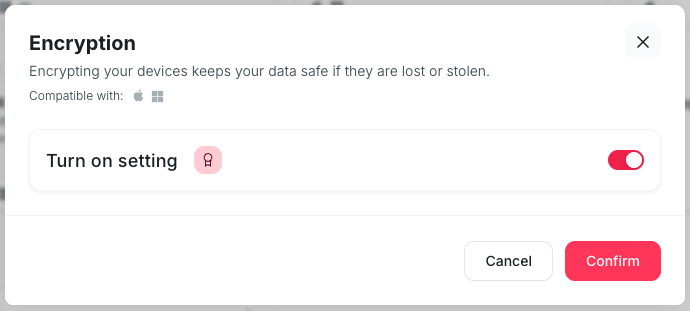
Disk Encryption
This policy is templated with Factorial IT and works for both macOS and Windows devices.
- On Factorial IT, go to MDM > Profiles
- Select all devices
- Click on the card : Encryption
- Click on “Turn on setting”
- Finally, confirm
Password policy & Automatic ScreenLock
Short lock timeouts and strong password helps prevent attacks like shoulder-surfing, insider misuse and opportunistic access on unattended laptops.
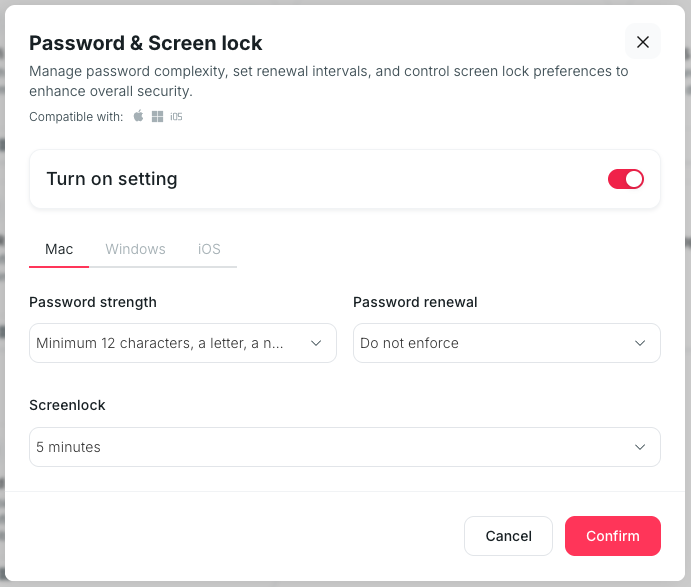
This policy is templated with Factorial IT and works for iOS, macOS and Windows devices.
- On Factorial IT, go to MDM > Profiles
- Select all devices
- Click on the card : Password & Screen lock
- Click on “Turn on setting”
- Navigate to Mac, Windows and iOS tabs to configure each one
- Finaly, confirm
Built-in Firewall
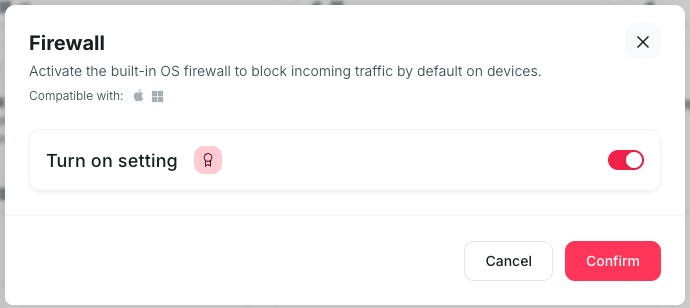
Default-deny inbound traffic reduces the chance that a dormant service becomes a network entry point, especially on public Wi-Fi.
This policy is templated with Factorial IT and works for both macOS and Windows devices.
- On Factorial IT, go to MDM > Profiles
- Select all devices
- Click on the card : Firewall
- Click on “turn on setting”
- Finally, confirm
Firewall Stealth Mode (macOS)
Hiding from ICMP and similar probes makes devices harder to enumerate in scans and slows worm propagation.
This policy is not templated with Factorial IT and needs to be configured as a Custom Profile Setting.
- On Factorial IT, go to MDM > Profiles
- Select all devices
- Click on the card : Add a custom MDM setting
- Give it a name (i.e. Block ICMP) and a description (i.e. the description above)
- For macOS, upload the following mobileconfig
<?xml version="1.0" encoding="UTF-8"?><!DOCTYPE plist PUBLIC "-//Apple//DTD PLIST 1.0//EN" "http://www.apple.com/DTDs/PropertyList-1.0.dtd"><plist version="1.0"> <dict> <key>PayloadType</key> <string>Configuration</string> <key>PayloadVersion</key> <integer>1</integer> <key>PayloadIdentifier</key> <string>com.getprimo.cis.6EC2A11D-313F-410F-B2FA-80F1D726624A</string> <key>PayloadUUID</key> <string>AE317001-B5E0-4F78-B971-954506775306</string> <key>PayloadDisplayName</key> <string>Firewall Stealth Mode</string> <key>PayloadRemovalDisallowed</key> <true/> <key>PayloadContent</key> <array> <dict> <key>PayloadType</key> <string>com.apple.security.firewall</string> <key>PayloadVersion</key> <integer>1</integer> <key>PayloadIdentifier</key> <string>com.getprimo.cis.stealth</string> <key>PayloadUUID</key> <string>B852FF89-DBE2-4F85-BE9C-20D180F5C859</string> <key>EnableStealthMode</key> <true/> </dict> </array> </dict></plist - Finally, confirm